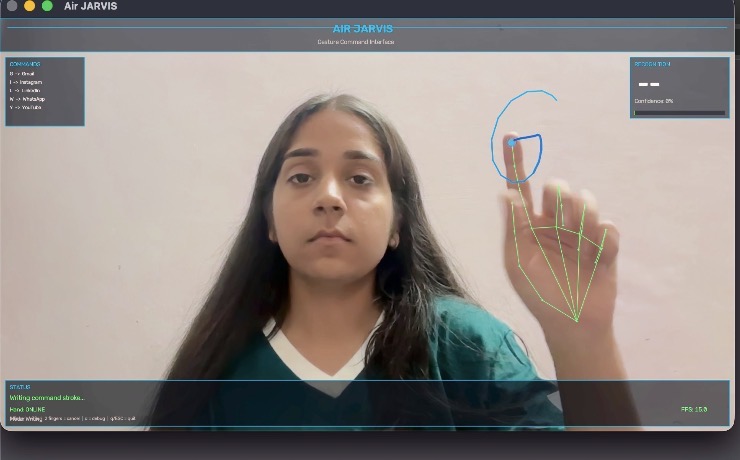
Imagine opening Instagram, Gmail, or YouTube without touching your keyboard or mouse — just by drawing a letter in the air with your finger. That's exactly what Air JARVIS does, and it's my latest open-source project, now live on GitHub.
What Is Air JARVIS?
Air JARVIS is a real-time, gesture-controlled desktop assistant that turns your webcam into a motion-sensing input device. Using hand tracking, it watches your index finger trace letters in the air and instantly matches them to a command — launching a website or application in a fraction of a second.
No special hardware, no wearables, no sensors. Just a standard webcam and your hand.
How It Works
At its core, Air JARVIS runs on a simple but clever pipeline:
- Capture — The webcam feed is processed frame by frame.
- Hand Tracking — MediaPipe detects your hand and tracks your fingers in real time.
- Gesture Detection — Raising one finger (index only) enters "writing mode," where your fingertip's path is recorded as a stroke. Raising two fingers cancels the stroke, and lifting your finger finalizes it.
- Normalization & Feature Extraction — The recorded stroke is normalized into a 0–1 coordinate space, and features like corners, direction sequences, and y-axis reversals are extracted.
- Template Matching — The processed stroke is compared against letter templates using a blended scoring formula (see below).
- Command Execution — Once the system is confident about which letter was drawn, it resolves the matching command and executes it — typically opening a URL in your browser.
score = 0.40 × template_distance
        + 0.25 × feature_similarity
        + 0.25 × direction_score
        + 0.10 × reversal_score
The whole process happens live, with a heads-up display (HUD) overlay showing your FPS, current mode, recognition results, and confidence score as you draw.
Key Features
- Real-time hand tracking powered by MediaPipe
- Air gesture recognition — write letters using just your index finger
- Instant command execution — launches URLs the moment a letter is recognized
- Live HUD overlay — FPS, mode, recognition results, and confidence score, all visible on screen
- Debug mode — press d to see per-letter scores and directional analysis
- Fully configurable — commands live in a simple config/commands.yaml file, so you can remap letters to any site or app you like
Gesture Controls
| Gesture | Description |
|---|---|
| 1 finger (index only) | Enter writing mode — draw a letter in the air |
| 2 fingers (index + middle) | Cancel the current stroke |
| q or ESC | Quit the application |
| d | Toggle debug overlay |
Default Commands
Out of the box, Air JARVIS ships with a handful of everyday shortcuts:
| Letter | Command | URL |
|---|---|---|
| I | instagram.com | |
| L | linkedin.com | |
| W | WhatsApp Web | web.whatsapp.com |
| G | Gmail | mail.google.com |
| Y | YouTube | youtube.com |
Want to add your own? Just edit config/commands.yaml — no code changes required.
Under the Hood: Project Structure
Air JARVIS is organized into clean, purpose-driven modules, making it easy to extend or modify:
air-drawing/
├── main.py                        # Entry point
├── requirements.txt               # Python dependencies
├── config/
│    ├── commands.yaml             # Gesture → command mappings
│    └── settings.py               # App-wide settings (FPS, thresholds, etc.)
├── backend/
│    └── app.py                    # Main application orchestrator
├── vision/
│    ├── camera.py                 # Webcam capture
│    └── hand_tracker.py           # MediaPipe hand tracking & gesture state
├── recognition/
│    ├── stroke_capture.py         # Records and normalizes finger stroke points
│    ├── direction_analyzer.py     # Analyzes directional movement patterns
│    ├── template_matcher.py       # Template-based letter recognition engine
│    └── base.py                   # Recognition result models
├── commands/
│    ├── engine.py                 # Resolves recognized letters to commands
│    └── models.py                 # Command data models
├── services/
│    ├── executor.py               # Executes commands (opens URLs, etc.)
│    └── logger.py                 # Action logging
├── ui/
│    ├── hud.py                    # Heads-up display overlay
│    ├── stroke_renderer.py        # Draws the live/completed stroke trail
│    ├── landmark_renderer.py      # Draws hand landmark skeleton
│    └── theme.py                  # Color palette constants
└── utils/
     └── fps.py                    # Smooth FPS counter
This separation of concerns — vision, recognition, commands, services, and UI each in their own layer — makes the codebase easy to navigate and a great reference if you're exploring computer-vision projects yourself.
Tech Stack
Air JARVIS is built entirely in Python, with a lean set of dependencies:
| Package | Version | Purpose |
|---|---|---|
| opencv-python | ≥ 4.8.0 | Camera capture & image rendering |
| mediapipe | 0.10.14 | Hand landmark detection |
| numpy | ≥ 1.24.0 | Numerical stroke processing |
| pyyaml | ≥ 6.0.0 | Command configuration parsing |
Why I Built This
Gesture-based interaction has always felt like something out of science fiction — but the tools to build it are more accessible than ever. Air JARVIS was my way of exploring how far you can push real-time computer vision and simple template-matching algorithms to create something genuinely fun and practical: a touchless way to launch your favorite apps and sites.
Try It Yourself
Air JARVIS is fully open source. Clone the repo, install the dependencies, and you'll be drawing letters in the air within minutes. Feel free to fork it, extend the gesture set, or plug in your own commands.
If you found this project interesting, consider following along on my social handles for more builds like this one!
Dikshu Grover works at the intersection of applied AI, marketing automation, and search. She is Google Cloud Gen AI leader and writes about the shift from ranking to recognition in AI-first search.